| Search |

Menu Manager
The Menu Manager makes it simpler for website admins to create and manage menu for content-heavy websites effectively.
Keep it simple and be consistent
Users need to be able to find all that you have to offer, without difficulty. So when you plan your menu structure, keep it simple, and be consistent.
Multi-dimensional navigation structure
The Menu Manager allows creating a multi-dimensional navigation menu for your website. Maybe now you are planning to develop a small website. But, one year later, your web site may not be so tiny as you expected. So in our principles of web design, you have to plan for the future. You cannot have a one-dimensional menu if you have more than about ten pages. Start organising your web page topics in sections and subsections.
Back to the pen and paper
When designing your web menu template, it is a good idea to write all of your main topics on a separate piece of paper, then write all of the related topics on their respective sheets. You could lay them out on the table, anywhere with enough space. This will give you the freedom to move them around until you get a logical order.
This is an easy way to plan your menu structure.
From a section to a subsection, you go from general to more specific: the deeper the visitor goes to your site, the more accurate and detailed the information. Also, bear in mind that a visitor reads the site from top to bottom: the sections should be organised accordingly.
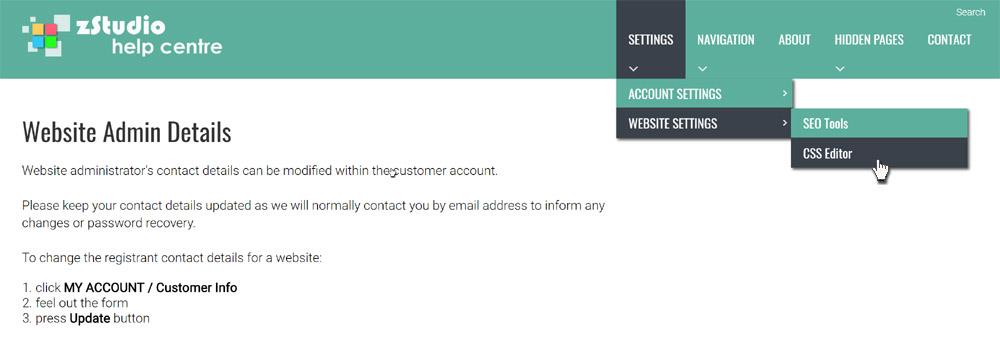
The name of each section or page must be carefully chosen and is fundamental as it gives the visitor an immediate snapshot of what is to be found in the section/page
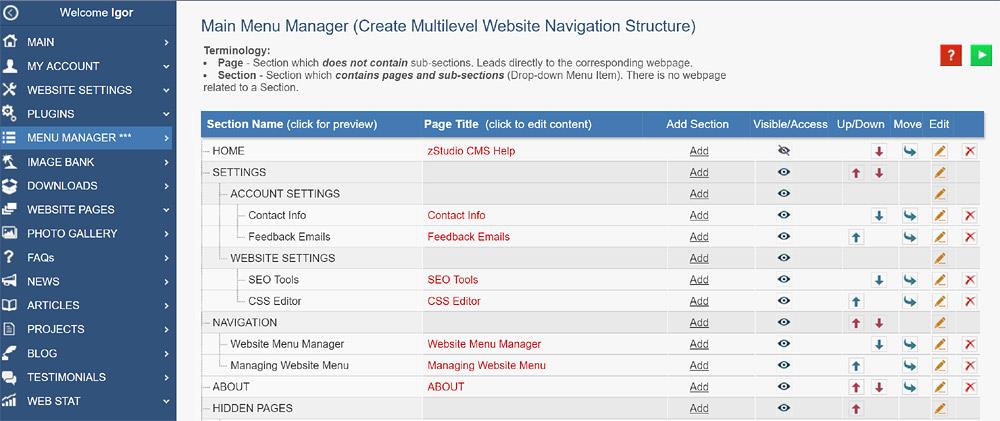
To start creating and editing the website menu, click on the MENU MANAGER*** tab in the Control Panel.
CONTENT (step-by-step)
ACCOUNT SETTINGS
WEBSITE SETTINGS
Google Analytics and other Scripts
NAVIGATION
CONTENT
IMAGES
MEDIA
PLUGINS
Expandable / Collapsible Block
VIDEOS