| Search |

Mini Gallery 2 (full screen pop-up)









Creating Mini Gallery2
1. In the Control Panel, select PLUGINS / Mini Gallery
2. Type the name of the gallery
3. Define parameters, separated by comas
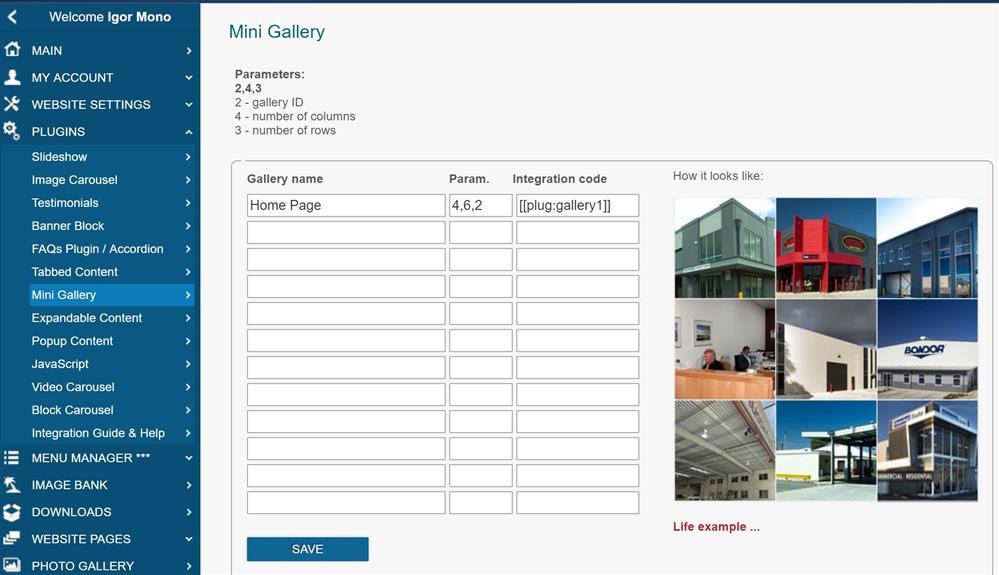
Parameters:
- Gallery ID
- Number of columns
- Number of rows
To integrate Mini Gallery 2, use the following code example:
[ [plug:gallery1] ]
Example
All Plugins
AJAX Plugins and DemosSlideshow
Gallery Widget
Mini Gallery
Mini Gallery 2
Image Slider Plugin
Banner Block
Expandable / Collapsible Block
Tabbed Content
Accordion
News Ticker
Image Carousel
Image Carousel - River Style
Video Carousel
Latest News Widget
Testimonial Slider
Latest Project Widget
Line and Pie Charts Plugin
Web Poll Widget