| Search |

Image Carousel
Creating Image Carousel
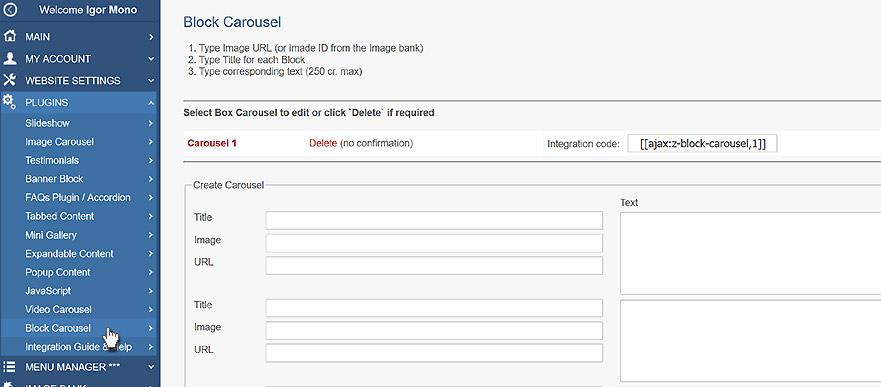
1. In the Control Panel, select PLUGINS / Block Carousel.
2. Type a Title (caption) for each Image.
3. Type Image ID at the Image Bank or Image URL.
4. Type a URL to link image to required page if you need it.
5. Type a Text for the corresponding image.
6. When finished, click SAVE button.
Integrating a Image Carousel into the page
To integrate a Video Carousel plugin into the web page, you need to type its integration code:
[ [ajax:z-block-carousel,1;h3] ]
Where:
1 - carousel ID
h3 - title heading (p, h2, h3, h4) - you may ignore this parameter and default heading will be h3
All Plugins
AJAX Plugins and DemosSlideshow
Gallery Widget
Mini Gallery
Mini Gallery 2
Image Slider Plugin
Banner Block
Expandable / Collapsible Block
Tabbed Content
Accordion
News Ticker
Image Carousel
Image Carousel - River Style
Video Carousel
Latest News Widget
Testimonial Slider
Latest Project Widget
Line and Pie Charts Plugin
Web Poll Widget
Example