| Search |

Inserting Images
Inserting Images in FCKeditor is very simple. Just press the button  on the toolbar. A popup window called "Image Properties" will appear. It includes four bookmarks:
Image Info
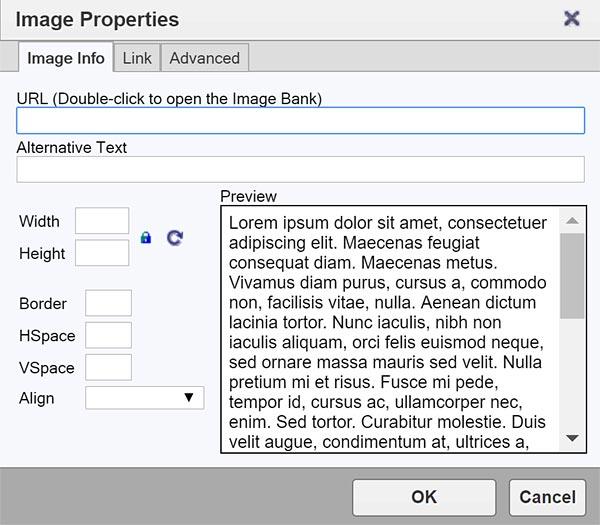
The first bookmark refers to the "Image Info"
- URL : defines the URL address of the image. You may double-click on the URL field to open the image bank in order to browse the files visually.
- Alternative Text : puts the descriptions of the image if you want it to be different than the image name.
- Width : specifies image width.
- Height : specifies image height.
You may lock the image proportions by pressing  or you can return to the original image size by pressing
  .
.
- Border: specifies the size of the border you want to place around the image.
- HSpace : defines the size of the horizontal gap.
- VSpace : defines the size of the vertical gap.
- Align : specifies the alignment of the image. You can choose from: Left, Abs Bottom, Abs Middle, Baseline, Bottom, Middle, Right, Text Top or Top.
Pressing "OK" inserts the image with the specified properties.
CONTENT (step-by-step)
ACCOUNT SETTINGS
WEBSITE SETTINGS
Google Analytics and other Scripts
NAVIGATION
CONTENT
IMAGES
MEDIA
PLUGINS
Expandable / Collapsible Block
VIDEOS