| Search |

Image Carousel - River Style
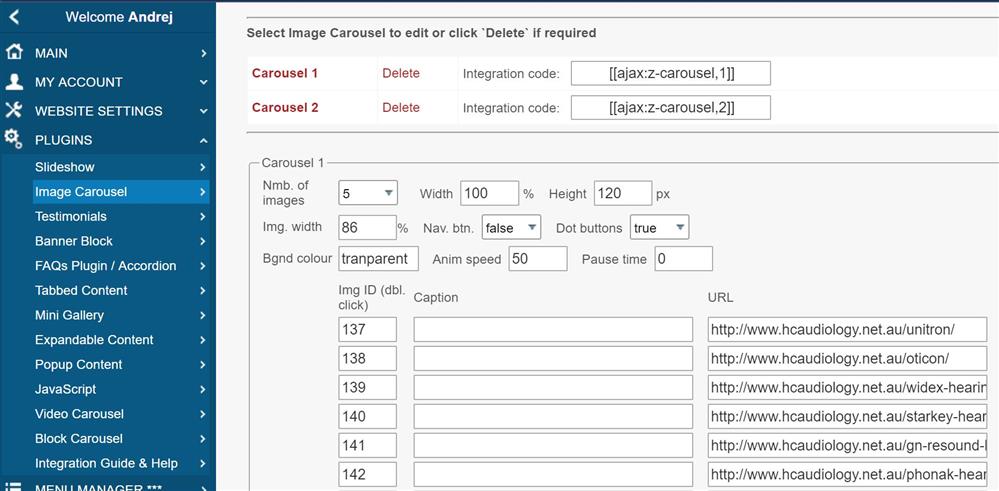
Creating Image Carousel
First, prepare images in JPG format and upload them into the image bank.
All images need to be the same size (view example below).


1. In the Control Panel, select PLUGINS / Image Carousel.
2. Select a number of images in row.
3. Type the carousel width (usually 100%).
4. Type a height of the image carousel.
5. Type a width of the image.
6. Type a Caption for each Image.
7. Type an Image ID at the Image Bank.
8. Type a URL to link image to required page if you need it.
9. When finished, click SAVE button.
Integrating a Image Carousel into the page
To integrate an Image Carousel plugin into the web page, you need to type its integration code:
[ [ajax:z-carousel-river,1] ]
Where:
1 - carousel ID
All Plugins
AJAX Plugins and DemosSlideshow
Gallery Widget
Mini Gallery
Mini Gallery 2
Image Slider Plugin
Banner Block
Expandable / Collapsible Block
Tabbed Content
Accordion
News Ticker
Image Carousel
Image Carousel - River Style
Video Carousel
Latest News Widget
Testimonial Slider
Latest Project Widget
Line and Pie Charts Plugin
Web Poll Widget
Example