| Search |

Image Slider Plugin
To integrate an Image Slider, copy and paste this code into your web page in the place where you want it to appear:
[ [ajax:z-gallery-slide,6;100;c;1] ]
Custom parameters ( separated by "; " )
- 6 - gallery ID
- 100 - width of the Gallery (in %)
- c - reserved (not in use)
- 1 - pagination thumbnails (1-yes, 0-no)
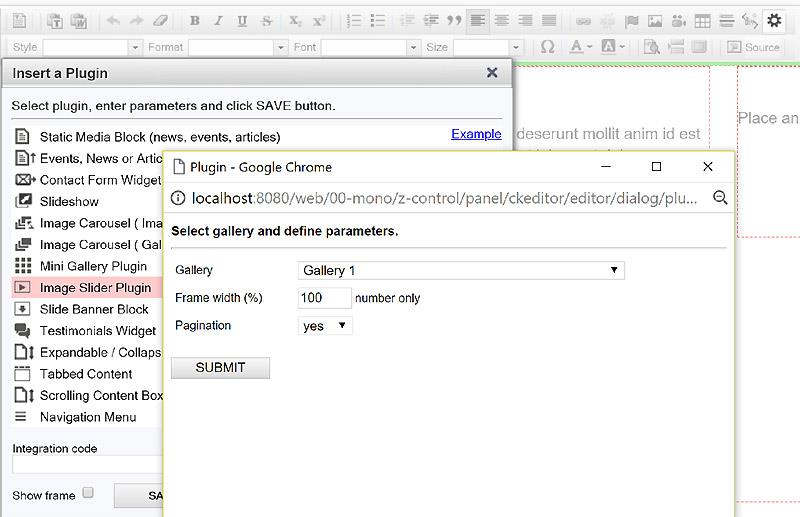
Another way is using the Insert Plugin tools in the toolbar.
- Place the cursor at the required gallery position on a page.
- Click Insert Plugin icon on the Toolbar.
- Select Image Slider Plugin in the plugins page.
- Select a required gallery in the drop-down box.
- Specify parameters.
- Click SUBMIT button, then SAVE in the parent window.
Example 1 (with tumbnails)
Example 2 (no tumbnails)
All Plugins
AJAX Plugins and DemosSlideshow
Gallery Widget
Mini Gallery
Mini Gallery 2
Image Slider Plugin
Banner Block
Expandable / Collapsible Block
Tabbed Content
Accordion
News Ticker
Image Carousel
Image Carousel - River Style
Video Carousel
Latest News Widget
Testimonial Slider
Latest Project Widget
Line and Pie Charts Plugin
Web Poll Widget