
Search   
zStudio CMS Help
  • SETTINGS
    • ACCOUNT SETTINGS
      • Contact Info
      • Feedback Emails
    • WEBSITE SETTINGS
      • SEO Tools
      • CSS Editor
      • Google Analytics and other scripts
  • NAVIGATION
    • Website Menu Manager
    • Managing Website Menu
  • CONTENT
    • Online HTML Editor
    • Editor Overview
    • Text Formatting
    • Links, Emails and Anchors
    • Inserting Images
    • Tables
    • Responsive Web Design
  • IMAGES
    • Preparing Images for Website
    • Multiple Image Resizer
    • Website Image Bank
  • MEDIA
    • Adding Media Sections
    • Adding Articles
    • Downloads
    • Adding Video to a Web Page
  • PLUGINS
    • AJAX Plugins and Demos
    • Slideshow
    • Gallery Widget
    • Mini Gallery
    • Mini Gallery 2
    • Image Slider Plugin
    • Banner Block
    • Expandable / Collapsible Block
    • Tabbed Content
    • Accordion
    • News Ticker
    • Image Carousel
    • Image Carousel - River Style
    • Video Carousel
    • Latest News Widget
    • Testimonial Slider
    • Latest Project Widget
    • Line and Pie Charts Plugin
    • Web Poll Widget
  • TRAINING VIDEOS
    • Website Management
    • Online Editor Demos
    • Online Store
    • Real Estate Website Management
    • Видео на русском
  • HTML5 & CSS
    • CSS Examples - Images
    • CSS Examples
    • Blocks
    • One-Time Pop Up
    • CSS Accordion Block
  • ARTICLES

Mini Gallery

LOADING ...


To integrate a Mini Gallery plugin, copy and paste this code into your web page in the place where you want it to appear:


[ [ajax:gallery-m,1;3;100;capt;3;] ]


Custom parameters ( separated by "; " )

  • 1 - gallery ID
  • 3 - number of columns
  • 100 - width of the Gallery - %
  • capt - show image capture (or empty if not)
  • 3 - number of rows


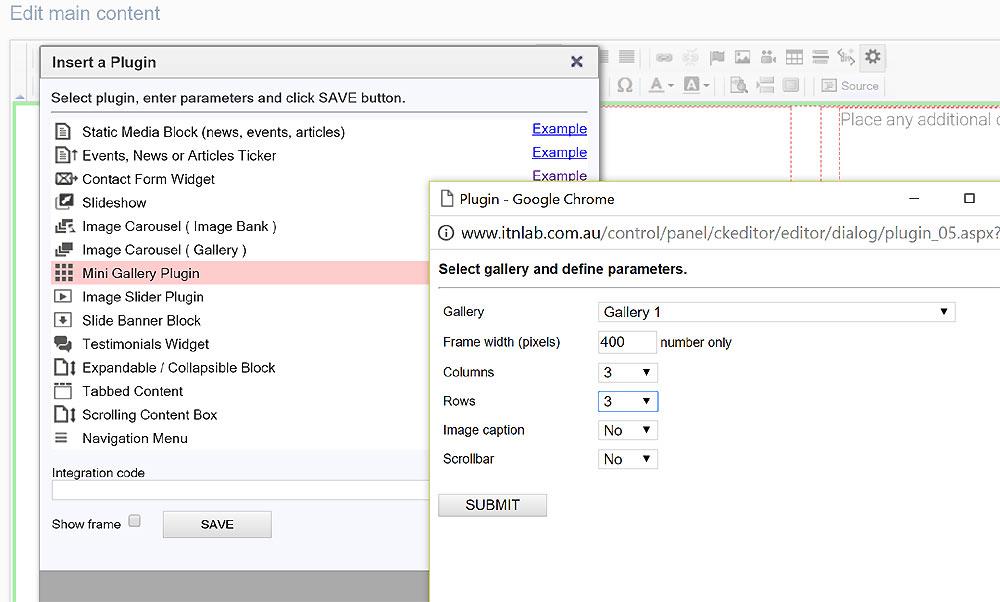
Another way is using the Insert Plugin tools in the toolbar.

  1. Place the cursor at the required gallery position on a page.
  2. Click Insert Plugin icon on the Toolbar.
  3. Select Mini Gallery Plugin in the plugins page.
  4. Select a required gallery in the drop-down box.
  5. Specify parameters. 
  6. Click SUBMIT button, then SAVE in the parent window.


Example

LOADING ...


All Plugins

AJAX Plugins and Demos
Slideshow
Gallery Widget
Mini Gallery
Mini Gallery 2
Image Slider Plugin
Banner Block
Expandable / Collapsible Block
Tabbed Content
Accordion
News Ticker
Image Carousel
Image Carousel - River Style
Video Carousel
Latest News Widget
Testimonial Slider
Latest Project Widget
Line and Pie Charts Plugin
Web Poll Widget


| © WebAdelaide Studio |