| Search |

Tabbed Content Plugin
This plugin places a Tabbed Block on your page.
A big challenge to web designers is finding a way to place a lot of content on a page without losing usability. Tabbed content is the best way to solve this issue. For instance, if you have a limited amount of screen, tabs can allow you to save space by giving the user a way to toggle between several items.
To start editing a tabbed content:
1. click on PLUGINS / Tabbed Content tab in the Control Panel.
2. Click Create New Tabbed Block button.
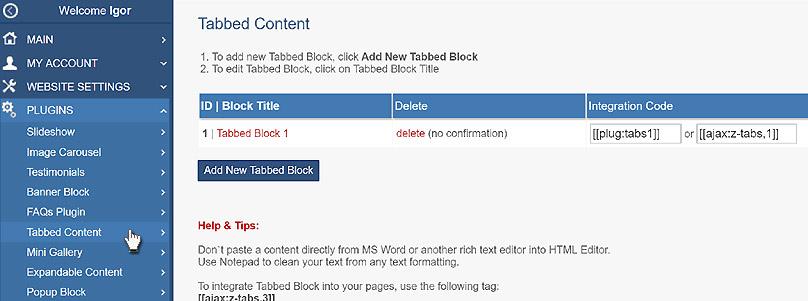
3. Type a Block Title.
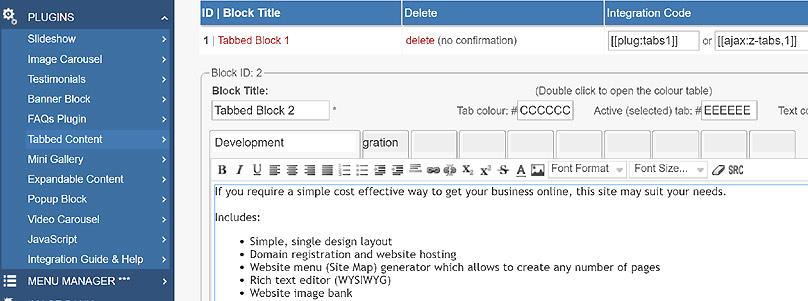
4. Type a caption for each required tab.
5. Type or paste a required content in the editor under each tab.
6. Then click SAVE button.
Integrating a Tabbed Block into the page.
To integrate a Tabbed Block plugin into the web page, you need to type its integration code:
[ [plug:tabs1 ] ] or [ [ajax:z-tabs,1] ]
Where 1 is the block ID.
Another way is using the Insert Plugin tools in the toolbar.
1. Place the cursor at the required slideshow position on a page.
2. Click Insert Plugin icon on the Toolbar.
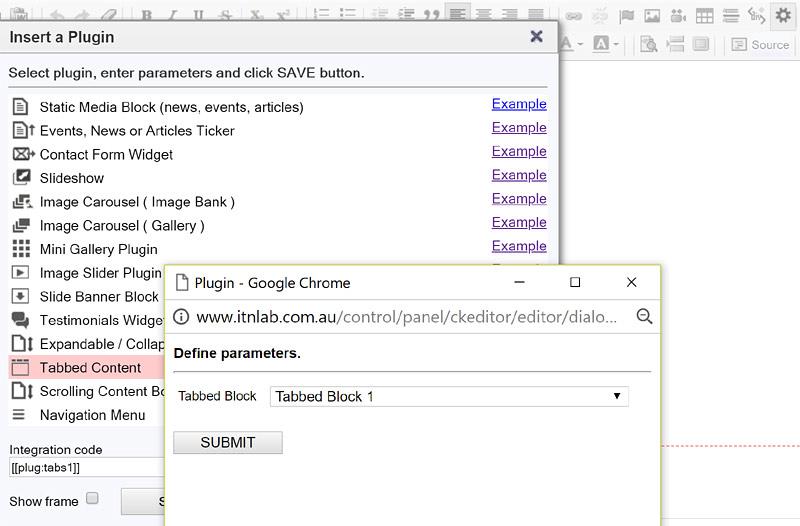
3. Click Tabbed Block on the plugins page.
4. Select a required Tabbed Block in the drop-down box and click SUBMIT button then SAVE in the parent window.
All Plugins
AJAX Plugins and DemosSlideshow
Gallery Widget
Mini Gallery
Mini Gallery 2
Image Slider Plugin
Banner Block
Expandable / Collapsible Block
Tabbed Content
Accordion
News Ticker
Image Carousel
Image Carousel - River Style
Video Carousel
Latest News Widget
Testimonial Slider
Latest Project Widget
Line and Pie Charts Plugin
Web Poll Widget
Example